Reviews
Review requirements together – with a moderator, reviewers and authors, in several rounds and with a traceable conclusion.
Work in progress. This documentation is not complete yet. If something is missing, write to us: support@wiestigo.com
As of 11 October 2026 · checked against Wiestigo Mirador 0.1.0
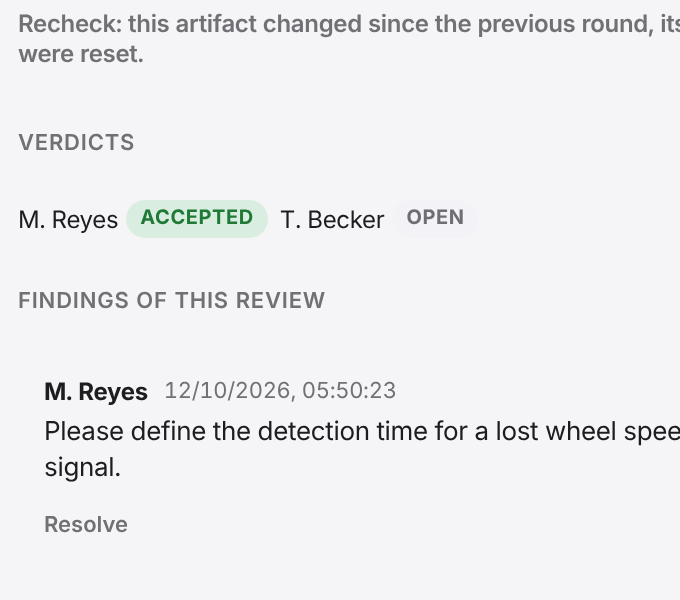
A review judges a frozen state: every invited reviewer gives a verdict per requirement, findings are kept as comments on the requirement, and after rework the next round only re-assesses what has changed.
Roles
| Role | may |
|---|---|
| Moderator | edit, start, begin new rounds, close or cancel the review. The moderator is whoever creates the review. |
| Reviewer | give a verdict per requirement. Read access to the project is enough. |
| Author | rework the requirements while the review is running – this needs at least the EDITOR role in the project |
A project administrator can act in place of the moderator.
Create a review
In the Review view, choose New review. Anyone who may edit in the project may create one.
- Name and Description.
- Subject: an Existing baseline, or Freeze the current state as a new baseline now.
- Scope: the whole frozen project, selected artifacts, the artifacts of a variant, or the hits of a saved filter. A subset needs an existing baseline.
- Reviewers and Authors – both must be members of the project.
- Optionally a Due date. A passed due date is shown but closes nothing.
With Start immediately, Create as draft becomes Create and start. A draft can still be changed and deleted.
Giving verdicts
Reviewers open the review from their list under Running and pick a requirement. In the panel on the right they give their verdict:
- Accepted
- Not accepted – this requires a finding. It is stored as a comment on the requirement, marked as a review finding, and the authors are notified.
The table shows per requirement how many reviewers have accepted, not accepted or not yet judged. A finding is closed with Resolve.
Rounds
Once the authors have reworked, the moderator begins the next round with New round, optionally with a note. This
- freezes the current state as a new baseline,
- keeps the verdicts on unchanged requirements,
- resets the verdicts on changed requirements, which are marked recheck.
So in every round the reviewers judge only what has changed. Show differences puts the old and the new text side by side.
Closing
Close asks for the Overall outcome – Accepted, Accepted with conditions or Rejected – and optionally a closing note. If verdicts are still missing, a reason for closing early is required. A closed or cancelled review cannot be changed.
If the project has a status rule, closing sets an attribute to a value on every requirement all reviewers accepted – for example the status to “Accepted”. The rule is shown in the dialogs for creating and closing; it is set in the administration.
List and notifications
The list filters by Running, Drafts and Finished – your own reviews across all projects – and by Project (all reviews of the current project you may see).
The bell at the top right notifies participants of invitations, start, new rounds, closing and cancelling, and the authors of “not accepted” verdicts.